Secure Authentication, MFA, and Passwordless Technologies
Authentication factors, , Microsoft Authenticator, OATH, hardware tokens, Windows Hello for Business, ,, biometrics, Temporary Access Pass, ,,, password protection, and
Suggested study time: 39 minutes • Beginner level • Aligned with the Describe the authentication capabilities of Microsoft Entra ID module of the SC-900 exam
By João Ricardo Dutra••Full material
Introduction
Authentication arose from the need to prove that a person was really who they claimed to be. In the earliest systems, that proof was almost always a password stored and compared by the computer. As corporate networks, internet services, and cloud applications expanded, a single memorized piece of information was no longer enough: passwords began to be reused, stolen through phishing, guessed by automated attacks, and exposed in breaches. This context drove multifactor authentication and, more recently, cryptographic credentials.
For the reader, understanding secure authentication means understanding the first barrier that protects accounts, data, and services. For society, stronger methods reduce fraud, account takeover, service disruption, and exposure of personal information. The topic also has a direct effect on productivity: well-designed authentication protects without turning every sign-in into a confusing process.
In this chapter, the central question will not just be “which method exists?”, but “which threat does it reduce, at which stage does it act, and which limitations remain?”. By the end, you will be able to analyze a sign-in in Microsoft Entra ID as a complete flow: method registration, identity proof, policy evaluation, token issuance, account recovery, and auditing.
1. Authentication in the context of digital identity
Identification is the assertion of an identity, usually by username, email address, or . Authentication is the process that verifies that assertion through a credential. Authorization comes afterward and determines which actions the authenticated identity can perform. Identity administration maintains accounts, methods, permissions, and lifecycle. Confusing these concepts leads to classic errors: a user can be authenticated correctly and still not be authorized to open a particular resource.
Fundamental identity concepts: each one answers a different question.
Concept
Question answered
Example
Identification
Who claims to be signing in?
joao@contoso.com
Authentication
How do they prove they are that person?
Password, key, or Authenticator.
Authorization
What can they do after signing in?
Read a file, administer a .
Auditing
What happened and by whom?
Sign-in log, method, and result.
Recovery
How to regain access securely?
or account recovery.
Key point
Authentication does not grant permission by itself. It provides a verified identity so that authorization controls, such as roles and policies, make the access decision.
2. Brief evolution: from the password to phishing-resistant credentials
The password became dominant because it was cheap, simple to implement, and easy to carry between systems. However, its security depends on the human ability to create and protect a secret. Users tend to reuse patterns, and attackers exploit that predictability with brute force, password spray, credential stuffing, and phishing. Systems also had to evolve in how they store passwords, using hash functions and protection techniques instead of plaintext.
Multifactor authentication added a second category of proof. Then smartphones popularized notifications and temporary codes. The next step was to remove the password from the main flow and use asymmetric cryptography, with a private key protected on the device and a public key registered with the identity provider. ,, and Windows Hello for Business belong to this evolution and offer superior resistance to fake login pages.
3. Authentication factors
A factor is a category of evidence used to prove identity. The three classic factors are knowledge, possession, and inherence. requires two or more independent factors; performing two verifications from the same category may increase friction, but it does not produce the same protection as a truly multifactor combination.
Figure 1 — The three classic authentication factors and how is composed.
3.1 Something you know
Includes password, PIN, and other memorized information. The value of the factor depends on it being secret and hard to guess. In Windows Hello for Business and keys, the PIN is not a password sent to the server: it locally unlocks a private key bound to the authenticator. This difference is important for the SC-900.
3.2 Something you have
It is the possession of an authenticator, such as a registered phone, OATH token, smart card, or security key. Possession alone is not always enough; strong methods also require presence, PIN, or biometrics. A phone can receive SMS, generate TOTP, store a , or approve a notification - these are different mechanisms using the same physical device.
3.3 Something you are
Biometrics represent physical or behavioral characteristics. In modern solutions, the fingerprint or face usually unlocks a local credential; the cloud service receives a cryptographic proof, not the biometric image. Thus, biometrics are usually part of an authenticator tied to the device, and not data sent to Microsoft Entra ID for centralized comparison.
3.4 Context signals are not automatically factors
Location, IP address, device compliance, risk, and behavior can influence a decision. They are important signals, but they must not be confused with the classic authentication factors. A policy can use these signals to require , block sign-in, or accept a stronger method.
4. Microsoft Entra ID authentication methods
Microsoft Entra ID offers methods for primary authentication, ,, and recovery. Not every method serves every purpose. A method can be accepted as a first factor, as a second factor, as recovery proof, or in more than one of these stages. The method policy defines which users and groups can register and use each option.
Microsoft Entra ID authentication methods, main use, factor, and notes.
Method
Main use
Factor / characteristic
Note
Password
Primary authentication
Knowledge
Broad compatibility, but vulnerable to theft and reuse.
Microsoft Authenticator - notification
Possession + interaction
reduces accidental approvals and fatigue.
Microsoft Authenticator - phone sign-in
primary
Possession + PIN/biometrics
Key-based credential tied to the app/device.
Authenticator or OATH app - TOTP
/ recovery per policy
Possession of the OATH secret
Temporary code entered by the user.
OATH hardware token
Possession
Useful when a smartphone is not allowed or available.
SMS / voice call
or recovery
Possession of the number/phone
More exposed to interception, SIM swap, and social engineering.
Windows Hello for Business
primary / strong
Device + PIN/biometrics
Private key protected on the device.
security key /
primary
Authenticator + local gesture
Phishing-resistant and bound to the legitimate domain.
Temporary Access Pass
Onboarding and recovery
Temporary credential
Facilitates initial registration of strong methods.
X.509 certificate
Primary / per configuration
Possession of a private key
PKI integration and phishing-resistant authentication.
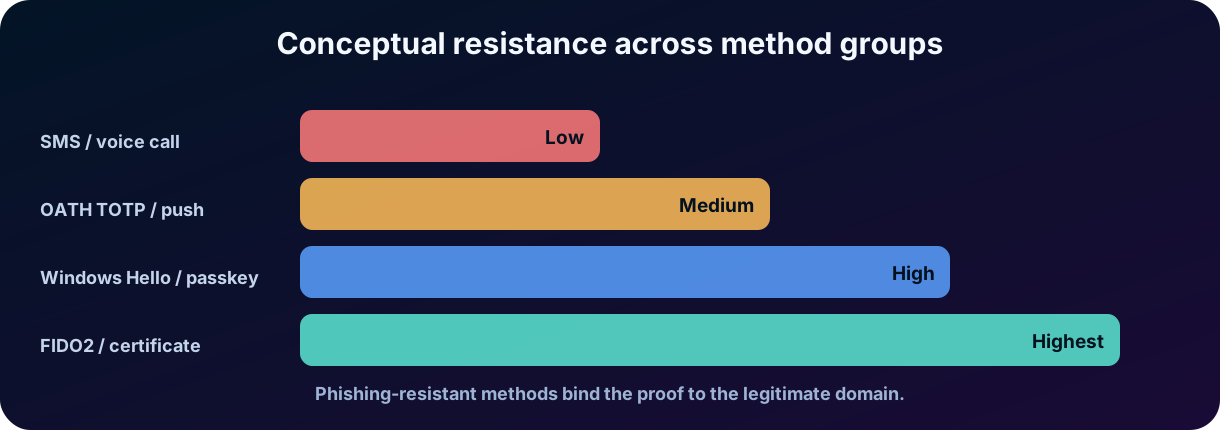
Figure 2 — Conceptual comparison of resistance across method groups.
Caution
The table is conceptual and does not replace the official compatibility matrix. The exact use of each method for sign-in, ,, or recovery depends on policy, licensing, account type, and service updates.
5. Passwords: operation, value, and limitations
The password remains present because it works on virtually any device and application. It belongs to the knowledge factor and can start a modern sign-in in Microsoft Entra ID. However, a strong password does not eliminate risks of phishing, malware, reuse, or leakage. Therefore, the recommended strategy is to combine password protection, , and a progressive migration to and phishing-resistant methods.
5.1 A strong password is not the same as an impossible-to-compromise password
Length, unpredictability, and uniqueness make a password more resistant to guessing. Even so, a fake page can capture an excellent password. Likewise, a password reused on another service can be tested by credential stuffing. The defense must consider the attack method, not just complexity.
5.2 Password hashing and authentication
Secure services do not need to store passwords in plaintext. A hash function transforms the input into a derived value. In hybrid identity with Password Hash Synchronization, the process does not copy the readable password to the cloud; a hash derived from the Active Directory hash is synchronized to allow validation in Microsoft Entra ID. This topic was introduced in the previous chapter and connects to secure authentication.
6. Microsoft Entra multifactor authentication
Microsoft Entra requires an additional form of verification when a policy determines that the sign-in needs more trust. The requirement can be applied by ,, risk policies, per-user configuration, or other integrations. The result is not simply “ask for a code”: the service evaluates the method used and whether it satisfies the defined requirement.
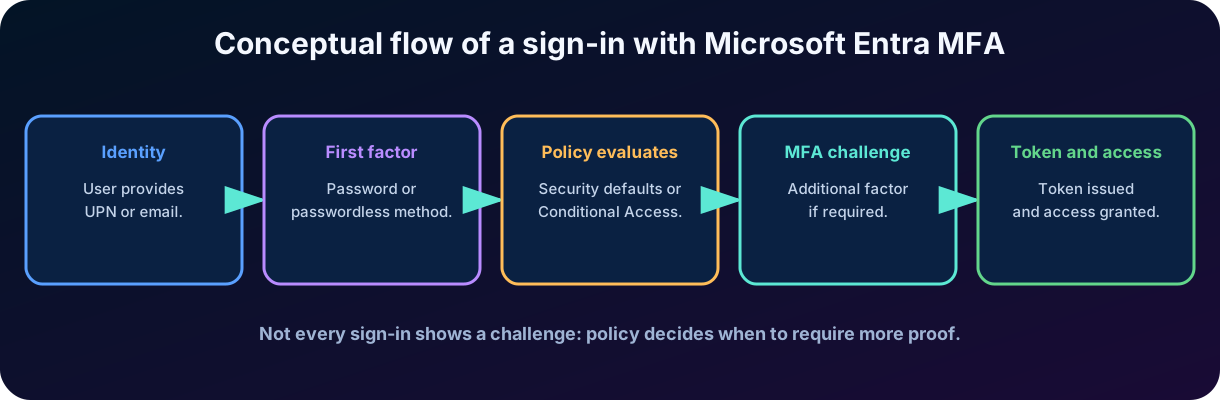
Figure 3 — Conceptual flow of a sign-in with Microsoft Entra .
6.1 and step-up authentication
A session can start with one level of trust and require additional authentication when the user attempts a sensitive action. This increase in assurance is called step-up authentication. For example, reading a portal may be allowed with the current session, while changing administrative settings requires an method or a phishing-resistant .
6.2 does not mean a on every sign-in
Policies can consider an existing session, sign-in frequency, device, risk, location, and application. Therefore, a user enabled for does not always receive a challenge on every authentication. On the exam, “the user uses ” means that the environment may require additional proof according to policy, not that every access necessarily shows two screens.
6.3 Per-user ,, and
enforcement models in Microsoft Entra and their typical uses.
Model
Characteristics
Typical use
Per-user
Legacy per-account configuration; enabled and enforced states.
Older environments and transition.
Simple, preconfigured baseline with no granularity.
Small or without complex policies.
Rules with users, apps, conditions, risk, and controls.
Organizations with granular requirements and adequate licensing.
7. Microsoft Authenticator
Microsoft Authenticator is a mobile app for Android and iOS that can participate in ,, sign-in, and . The same app supports distinct mechanisms; therefore, it is important to identify which experience is being used in a question.
7.1 Push notifications for
The user receives a request on the phone and approves or denies it. presents a number on the sign-in screen and requires the user to enter it in the app, reducing approvals by habit. Additional information, such as the application name and approximate location, helps recognize unexpected requests.
7.2 verification codes
The app also generates time-based temporary codes. The code changes periodically and is entered in the sign-in interface. This method works even when the phone does not receive a data notification at that instant, because the code is computed locally from a shared secret and time.
7.3 sign-in through the app
In phone sign-in, the user provides the identity and responds in the Authenticator using the registered device, PIN, or biometrics. Authentication is key-based, not the sending of a password. in the Authenticator extend the experience and offer phishing resistance by binding authentication to the legitimate service.
7.4 fatigue
In fatigue attacks, the attacker already has the password and fires many requests hoping the user approves one of them. , request context, training, and blocking of suspicious sign-ins reduce this risk. The best control is to prevent methods that can be approved by mistake from being the only barrier to critical resources, using phishing-resistant authentication whenever possible.
8. Temporary codes, OATH, and hardware tokens
OATH is a family of standards for one-time passwords. TOTP creates codes based on time; HOTP creates codes based on a counter. In Microsoft Entra environments, authenticator apps normally use TOTP. OATH hardware tokens produce codes without depending on a smartphone and can serve sectors with operational restrictions.
Temporary codes and tokens: operation, advantage, and limitation.
Type
How it works
Advantage
Limitation
TOTP in an app
Secret + clock generate a temporary code.
Works offline and is broadly compatible.
Code can be entered on a phishing page.
OATH hardware token
Dedicated device displays an OTP.
No smartphone; physical separation.
Provisioning, inventory, and token loss.
SMS OTP
Code sent by the carrier.
Familiar and simple for users.
SIM swap, interception, and network dependency.
Voice call
User confirms by call.
Accessibility in some scenarios.
Social engineering, forwarding, and low phishing resistance.
Important difference
A one-time code reduces direct reuse, but does not guarantee phishing resistance. An attacker in an intermediary position can capture and use an OTP in real time. avoids this problem by binding the cryptographic proof to the correct domain.
9. SMS, voice calls, and phone-based authentication
SMS and voice are methods based on possession of the phone or registered number. They can be useful for inclusion, transition, and recovery, but they offer lower assurance than cryptographic methods. The number can be transferred fraudulently, calls can be redirected, and messages can be exposed on improperly locked devices.
Microsoft Entra can also offer SMS-based sign-in for specific scenarios, such as frontline workers: the user signs in with a registered number and code, without a traditional password. This mode is different from using SMS only as a second factor after a password. For sensitive resources, Microsoft recommends migrating to phishing-resistant methods, such as , Windows Hello for Business, or certificate-based authentication.
10. What authentication means
authentication removes the password from the main flow. Instead of proving knowledge of a shared secret, the user proves possession of a private key and performs a local gesture, such as a PIN, biometrics, or a touch. The server registers the public key and validates a signature over a challenge. The private key remains protected in the authenticator.
does not mean single-factor authentication. Windows Hello for Business, Authenticator, and normally combine possession of the device or key with a PIN or biometrics. The experience is simpler because the user does not type a reusable password, while security is superior because there is no shared secret that can be captured by a fake page.
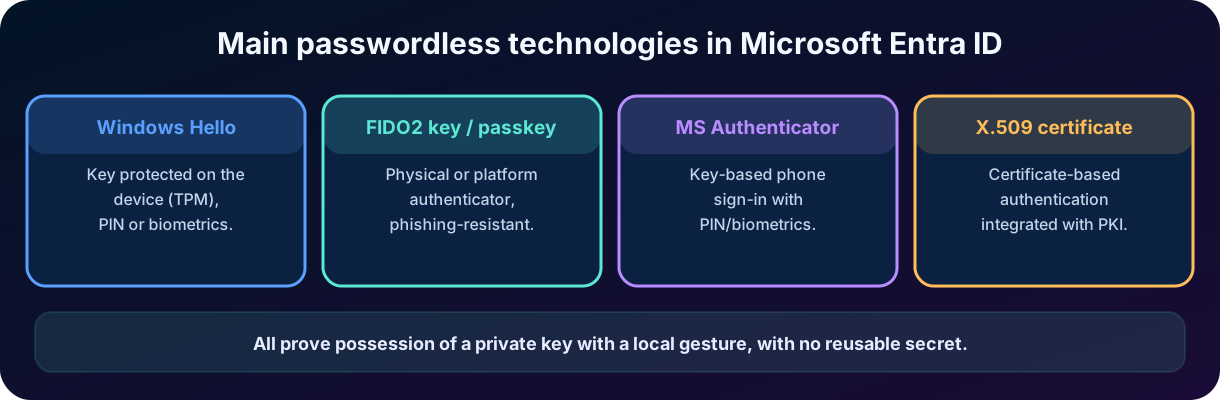
Figure 4 — Main technologies in Microsoft Entra ID.
Certificate-based authentication (X.509)
Microsoft Entra certificate-based authentication (CBA) lets users authenticate directly against Microsoft Entra ID with X.509 certificates issued by the organization's public key infrastructure (PKI) when signing in to applications and browsers. As with the other technologies in the figure, the proof is possession of the private key associated with the certificate, which can be held, for example, on a smart card, rather than a password. Before cloud-managed support was available, organizations had to deploy federated CBA with Active Directory Federation Services (AD FS); with Microsoft Entra CBA, authentication happens directly in Entra ID, which simplifies the environment and reduces cost. The method is phishing-resistant and works with policies, including those that require phishing-resistant .
11. Windows Hello for Business
Windows Hello for Business replaces passwords on Windows devices with strong key-based authentication. During provisioning, a public key is associated with the identity and the private key is protected on the device, often with a TPM. The user unlocks that key with a PIN or biometrics. The PIN is local to the device: knowing the PIN without possessing the equipment does not allow authentication on another computer.
11.1 Biometrics and PIN as local gestures
The fingerprint or facial recognition does not travel to Microsoft Entra ID. They unlock the local cryptographic material. The PIN works as an alternative or a local recovery requirement. This architecture limits the value of captured data: there is no universal password reusable across many services.
11.2 Relationship with SSO
After signing in to Windows, the device can obtain tokens that provide single sign-on to corporate applications. The user experiences fewer , but the organization continues to apply identity policies, device compliance, and authorization.
12. security keys and
combines WebAuthn and CTAP for authentication with public-key cryptography. A physical security key can be connected by USB, NFC, or another compatible means. A is a key-based FIDO credential that can reside on a device, manager, or compatible application. In Microsoft Entra, the / policy controls registration and use.
12.1 Why is phishing-resistant
The credential is bound to the correct site or relying party. A fake page on a different domain cannot request a valid signature for the legitimate domain. In addition, the private key is not transmitted. This reduces traditional phishing and adversary-in-the-middle attacks that rely on capturing password and OTP.
12.2 Physical key versus platform
The physical key is portable and useful on shared computers. A platform can remain protected by the hardware and the device account. The choice depends on the user profile, recovery requirements, portability, and organizational policy. For the SC-900, the central point is that both use and eliminate the reusable password from the flow.
13. Biometrics: benefits and cautions
Biometrics improve convenience because the user does not need to memorize a complex secret. However, biometric data cannot be “changed” like a password. Therefore, secure architectures avoid sending biometric templates to the identity provider and use them to unlock a locally protected key.
Biometrics must also have an alternative, such as a PIN, for accessibility and sensor failures. Organizations need to consider privacy, device protection, sensor quality, and local policies. In Microsoft Entra, the service normally receives the key proof, not the raw biometric data.
14. Temporary Access Pass -
The Temporary Access Pass is a time-limited credential, configurable for one-time use or multiple sign-ins within a period. It solves a bootstrap problem: how to register a strong method when the user does not yet have configured? The administrator issues a , the user signs in, and registers , Windows Hello for Business, or another allowed method.
also assists recovery when the strong authenticator was lost. Because it is temporary, it should be issued with minimal duration, delivered through a trusted channel, and audited. It does not permanently replace the normal methods and should not be treated as a static password.
15. Method policy and authentication strengths
The authentication methods policy allows enabling options for specific groups and configuring parameters. This helps migrate from weak to strong methods without releasing everything to everyone at once. Combined registration allows and information to be administered in a single security information experience.
15.1 Authentication strengths
An is a control that specifies which methods or combinations satisfy the policy. One rule may require “” in general, while another requires phishing-resistant methods. Thus, the organization can prevent SMS from satisfying the requirement of a critical application, even if SMS is enabled for other uses.
15.2 Registration, use, and recovery are different stages
Enabling a method does not mean all users have already registered it. Registering does not mean it will be required on every sign-in. And a method accepted for may not be accepted for . Exam questions frequently explore these operational differences.
16. Microsoft Entra
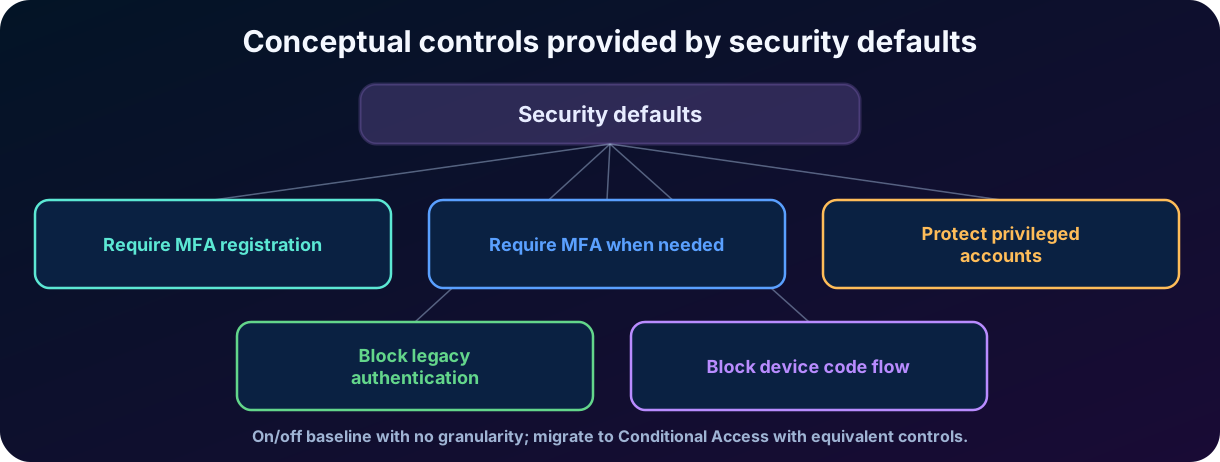
provide a ready-made baseline for that need essential protection without designing complex policies. They require registration, protect administrators and privileged activities, request when necessary, and block legacy authentication protocols. The configuration is essentially on or off, with little granularity.
Figure 5 — Conceptual controls provided by .
Organizations with exception, group, application, risk, or location requirements normally use with adequate licensing. When migrating, the policies must replace the baseline protections; simply disabling without equivalent controls reduces the security posture.
Relevant update
The official documentation consulted in July 2026 includes blocking the device code flow in for new . As cloud services evolve, always confirm the current behavior in Microsoft Learn before a real deployment.
17. Self-Service Password Reset -
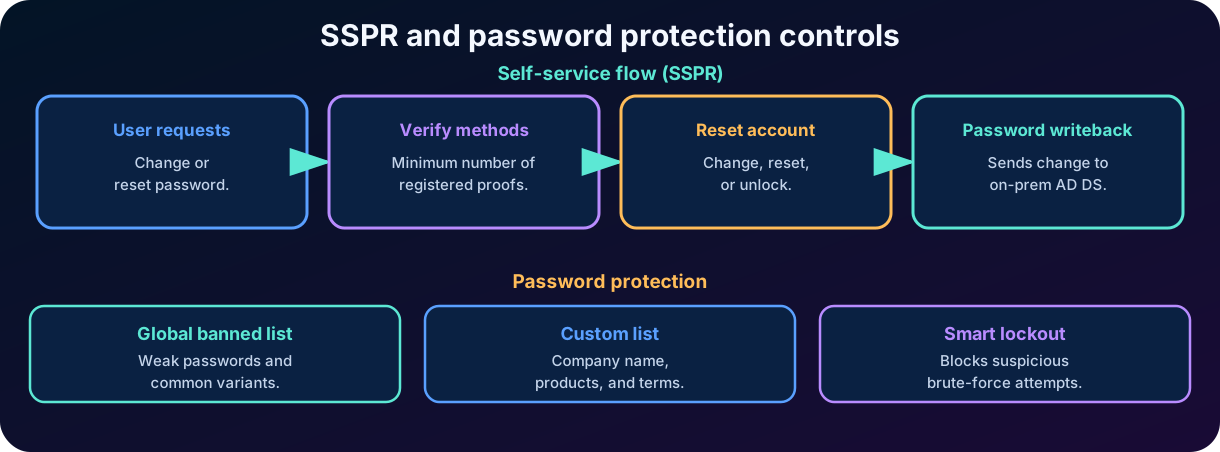
allows users to change or reset their own password and, in some scenarios, unlock the account without help desk intervention. The solution reduces calls, downtime, and operational cost. To be secure, it relies on prior registration of methods, a minimum number of proofs, and appropriate policies.
Figure 6 — Conceptual flow of and password protection controls.
17.1 Change, reset, and unlock
Changing a password normally happens when the user knows the current password. Reset is used when the password was forgotten or needs to be replaced after alternative proof. Unlock releases a locked account according to configuration. Although the interface may combine the experiences, the events have different meanings and policies.
17.2 Methods and number of verifications
The administrator defines the accepted methods and how many are required to reset. Requiring two methods increases assurance, but requires users to register enough options. The operational recommendation is to offer redundancy to prevent the loss of a phone from blocking all recovery.
17.3 in a hybrid environment
When configured and licensed, sends the change or reset performed in the cloud back to the on-premises Active Directory. The new password must obey local policies. This offers a single experience for hybrid users and keeps the password consistent across environments.
18. Password protection and management
18.1 Global banned password list
Microsoft Entra Password Protection uses a global list maintained by Microsoft to block weak, common, or compromised passwords and their variants. The evaluation considers predictable substitutions and patterns, so swapping a letter for a number does not always bypass the protection.
18.2 Custom list
The organization can add its own terms, such as company name, products, locations, or slogans that should not appear in passwords. The goal is not to create a list of all possibilities, but to block words that are very likely in the corporate context.
18.3 Protection in on-premises Active Directory
Microsoft Entra Password Protection agents can extend the global and custom list to AD DS domain controllers. This helps apply a consistent policy across hybrid identities. The deployment requires on-premises components and high-availability planning.
18.4
helps prevent guessing and brute force. The service tries to differentiate patterns of legitimate users from attackers, locking suspicious attempts without producing unnecessary downtime. It can also protect hybrid environments by filtering attacks before they reach AD DS, when properly configured.
18.5 Leaked passwords and risk
Password protection prevents weak choices at the moment of creation or change, while identity protection services can detect leaked credentials and . These are complementary controls. A previously accepted password can become dangerous after exposure and require remediation.
19. Common attacks and corresponding controls
Common authentication attacks and controls that reduce the risk.
Attack
How it works
Controls that reduce the risk
Phishing
Fake page or message captures a credential.
/WHfB, domain verification, training, .
Password spray
A few common passwords against many accounts.
Password Protection, ,, risk detection.
Brute force
Many attempts against one account.
,, monitoring.
Credential stuffing
Credentials leaked from another service are reused.
Unique password, ,, leaked credential detection.
fatigue
Many notifications to induce approval.
, context, risk blocking, phishing-resistant .
SIM swap
Attacker transfers the phone number.
Avoid SMS on critical resources; /WHfB.
Adversary-in-the-middle
Proxy captures password, OTP, and session.
Domain-bound and phishing-resistant methods.
Legacy authentication
Old protocols do not support modern controls.
Blocking via or .
Architecture reasoning
No method eliminates all risks. Choose layers: strong method, policy, device protection, secure recovery, monitoring, and lifecycle. The best method loses value if the recovery channel is weak.
20. Integrated practical scenario
Contoso has administrative staff, shop-floor operators, temporary contractors, and cloud administrators. The company wants to reduce phishing and password calls without blocking work. One possible strategy is to organize people and resources by risk.
All users register security information. can be used as an initial baseline, or when the company needs granular policies.
Administrators use keys or Windows Hello for Business and a phishing-resistant for privileged portals.
Employees with corporate laptops use Windows Hello for Business, with a local PIN or biometrics and SSO for applications.
Operators at shared stations use portable keys; OATH hardware tokens remain as an alternative where needed.
Microsoft Authenticator with is used by mobile users during the transition to .
SMS remains only for low-risk groups or temporary recovery, never as the only option for administrators.
is issued on the first day so new users can register methods; the credential expires quickly.
requires sufficient methods and integrates users synchronized to the on-premises AD DS.
The custom list blocks company name and products; and logs help detect password spray.
Reports and logs are reviewed to remove old methods and identify users still dependent on passwords.
How to answer the question
First identify the objective: ,, recovery, or password protection. Then observe the user profile and the threat. Finally, select the method and policy that satisfy the requirement with the lowest risk and acceptable friction.
21. SC-900 review
Quick matching guide for the SC-900 exam.
When the question mentions...
Think first of...
Something you know, have, or are
Authentication factors.
Two independent factors
.
Approve on the phone and
Microsoft Authenticator for .
Code that changes over time
.
Dedicated token that displays a code
OATH hardware token.
PIN/biometrics tied to the PC
Windows Hello for Business.
Physical cryptographic key or
/ WebAuthn.
Temporary credential to register a strong method
Temporary Access Pass.
User resets password without help desk
.
Change from the cloud to AD DS
.
Block weak terms and variants
Microsoft Entra Password Protection.
Block suspicious attempts
.
Simple and free baseline
.
Require only phishing-resistant methods
in .
21.1 Frequent conceptual pitfalls
The Windows Hello for Business PIN is not a domain password sent to the server; it unlocks a key on the device.
Biometrics are normally not stored in Microsoft Entra ID; they unlock the local credential.
Two steps do not guarantee two factors if both belong to the same category.
OTP reduces reuse, but can be captured by real-time phishing.
does not mean the user will be challenged on every sign-in.
does not mean the absence of verification; possession and a local gesture can provide two factors.
Enabling a method, registering it, and requiring it are different actions.
handles recovery; Password Protection handles the quality of new passwords; handles attempts.
is a simple baseline; offers granularity.
A method can work for and not work for primary authentication or .
One-sentence summary
Microsoft Entra strengthens sign-in by combining methods, policies, recovery, and password protection; the modern goal is to reduce dependence on reusable secrets and require phishing-resistant credentials for the highest-risk resources.
22. Conclusion
Secure authentication evolved from a simple password comparison to a system of graduated assurances. Independent factors raise trust, policies decide when to require more proof, and cryptographic methods eliminate the reusable password from the flow. Microsoft Authenticator, OATH, hardware tokens, Windows Hello for Business, , and offer different experiences for different profiles and risks.
and show that security does not end at the sign-in screen. Users need to register methods, recover accounts, and start using strong credentials without depending on fragile processes. Password Protection and reduce predictable passwords and automated attacks, while provides an initial base for that do not yet have advanced policies.
My assessment is that the most important concept in this chapter is the difference between “more steps” and “more assurance”. An additional code may improve the defense, but a credential bound to the device and the legitimate domain fundamentally changes the game against phishing. For the SC-900, mastering names and purposes is necessary; for professional practice, the goal should be to build an authentication journey that is strong, recoverable, auditable, and simple enough to be truly adopted.
Next step in the track
After understanding how an identity proves who it is, the next chapter studies how Microsoft Entra decides whether it can access a resource: ,, roles, scopes, and least privilege.
23. Review questions
1. Which option correctly represents multifactor authentication?
A) Password and secret question.
B) Password and memorized PIN.
C) Password and security key.
D) Two codes sent by SMS to the same phone.
Answer explained
Correct answer: C. The password is a knowledge factor and the key represents possession of an authenticator with cryptographic proof. The other options combine evidence from the same category or the same channel.
2. Which statement best describes Windows Hello for Business?
A) It sends the fingerprint to Microsoft Entra ID for comparison.
B) It replaces the password with a key tied to the device, unlocked by PIN or biometrics.
C) It is an OATH token that generates temporary codes.
D) It is a password reset policy.
Answer explained
Correct answer: B. Windows Hello for Business uses key-based authentication. PIN and biometrics are local gestures that unlock the private key protected on the device.
3. An organization wants to let users reset their own password and synchronize the new password with the on-premises Active Directory. Which features are directly related?
A) and .
B) and .
C) and .
D) and .
Answer explained
Correct answer: B. allows self-service reset; sends the change back to AD DS when the integration is configured and licensed.
4. Which feature is most appropriate to prevent SMS from satisfying the requirement of a critical application, requiring only phishing-resistant methods?
A) Custom banned password list.
B) .
C) in a policy.
D) Per-user in legacy mode.
Answer explained
Correct answer: C. Authentication strengths allow defining which method combinations satisfy the , including a phishing-resistant strength.
Essential glossary
Essential glossary for Chapter 4.
Term
Short definition
Authentication with two or more independent factors.
Sign-in without a reusable password, normally key-based.
Public-key authentication standards, including WebAuthn and CTAP.
A key-based FIDO credential stored in a compatible authenticator.
A one-time code derived from a secret and time.
A temporary credential for bootstrap or recovery of strong methods.
Self-service password reset.
Sending the password change from the cloud to the on-premises AD DS.
Protection against guessing and brute force with intelligent lockout.
A preconfigured set of basic Microsoft Entra protections.
An allowed set of methods that satisfies a policy.
The user enters in the Authenticator the number shown at sign-in.
Official references and update notes
The content was prepared based on the provided study plan and official Microsoft documentation consulted on July 23, 2026. Cloud features, names, and requirements can change; use the pages below for validation before a deployment.
Official sources consulted on July 23, 2026. As cloud services evolve continuously, licensing details, regional availability, menu names, and preview features should be confirmed in the current documentation before a real implementation.