Vulnerabilities, Threat Intelligence, and Exposure Management
Microsoft Defender Vulnerability Management, Threat Intelligence, ,, attack surface map, attack paths, ,, and
Suggested study time: 52 minutes • Beginner level • Aligned with the SC-900 study plan and official Microsoft Learn documentation
By João Ricardo Dutra••Complete material
1. Introduction: from the list of failures to continuous exposure management
Vulnerability management arose from the need to identify known flaws in systems before they were exploited. With the growth of the internet, databases like standardized the identification of vulnerabilities, while metrics like helped to express technical severity. However, modern environments have become so dynamic that a simple list of is no longer sufficient.
Today, teams need to answer more useful questions: is the failure in a critical asset? Is there active exploitation? Is the service reachable over the internet? Does a privileged identity connect this device to sensitive data? Are there compensating controls? This evolution brings vulnerability management, threat intelligence, and exposure management closer together.
For the reader, understanding this relationship allows prioritizing what really reduces risk, instead of treating thousands of alerts as equally urgent. For society, better decisions protect essential services, personal data, supply chains, and infrastructures that support health, education, finance, and government. Throughout the chapter, a vulnerability will cease to appear as just a number and will become part of a complete risk story.
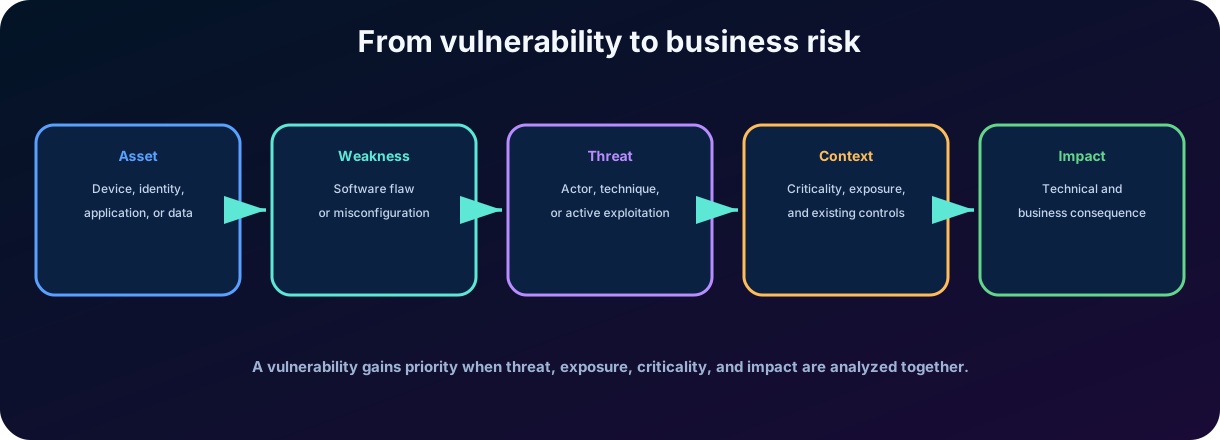
Figure 1 - A weakness only becomes a priority when it is analyzed in the context of threat, exposure, and impact.
2. Fundamental concepts
Concept
Practical definition
Example
Active
Any resource with value to the organization.
Device, identity, application, database, repository, or AI agent.
Vulnerability
Weakness that can be exploited.
Software failure, excessive permission, or insecure configuration.
Threat
Something capable of causing harm or exploiting a weakness.
Actor, malware, campaign, technique, or accidental event.
Exploit
Code or method used to exploit a vulnerability.
Remote execution due to a known flaw.
Risk
Combination of probability and impact.
Chance of compromise of a financial system and its consequences.
Exhibition
Contextual condition that makes the risk achievable or relevant.
Vulnerable server exposed to the internet and connected to a privileged account.
Mitigation
Measure that reduces probability or impact without necessarily removing the cause.
Lock the door or disable the function until a fix is applied.
Remediation
Action that corrects or eliminates weakness.
Update software, fix configuration, or remove component.
2.1 Vulnerability is not synonymous with incident
A vulnerability represents potential for exploitation. An incident indicates that signals have been correlated and there is a security situation to investigate. an organization may have a critical flaw without evidence of exploitation; it may also suffer an incident due to stolen credentials without a being involved.
2.2 , CWE, , and zero-day
is a standardized identifier for a disclosed vulnerability. CWE organizes classes of weaknesses, such as inadequate input validation. expresses technical severity through metrics, but alone does not represent business risk. Zero-day describes a vulnerability unknown to the vendor or still without a fix available when it begins to be exploited or disclosed.
Key point for the SC-900
The test tends to ask about purpose and conceptual difference. Defending Vulnerability Management identifies and prioritizes weaknesses; Threat Intelligence provides context about adversaries and infrastructure; Exposure Management shows how assets and relationships produce organizational risk.
3. Microsoft Defender Vulnerability Management
Microsoft Defender Vulnerability Management is a risk-based vulnerability management solution. It offers continuous asset discovery, inventories, assessments, recommendations, and remediation tracking for Windows, macOS, Linux, Android, iOS devices, and network devices, as supported and licensed.
3.1 Why is continuous discovery necessary?
Static inventories age quickly. New devices appear, versions change, extensions are installed, certificates expire, and vulnerabilities receive new exploits. The solution uses telemetry and discovery mechanisms to maintain a more up-to-date view of the environment, even when devices are not connected to the traditional corporate network.
3.2 Main inventories
Inventory
What helps to discover
Question answered
Devices
Observed endpoints and equipment.
Which assets exist and what is their condition?
Software
Applications, versions, and presence by device.
Where is the vulnerable version installed?
Browser extensions
Add-ons and versions.
Are there unsafe or unauthorized extensions?
Certificates
Digital certificates and validity.
Which certificates expire or use weak parameters?
Hardware and firmware
Models, BIOS, processors, and firmware.
Are there vulnerabilities below the operating system?
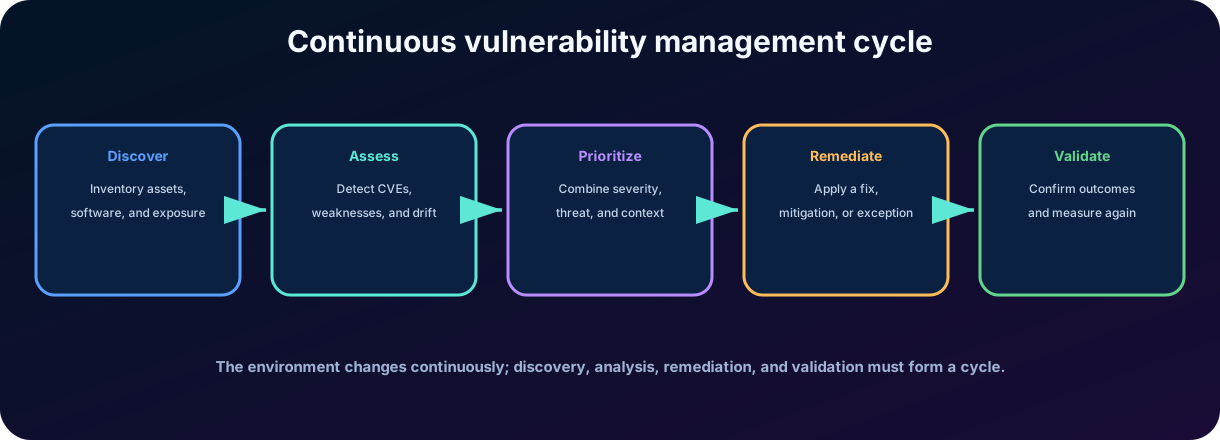
Figure 2 - Vulnerability management is a continuous cycle, not a one-time scan.
4. Evaluation of vulnerabilities and configurations
4.1 and vulnerable software
The solution relates installed versions to known vulnerabilities and shows exposed devices. The analyst can investigate a , check affected software, understand threat evidence, and evaluate recommendations. This view is more useful than manually searching each machine.
4.2 Incorrect settings and recommendations
Not all risk comes from a code flaw. Unnecessary services, outdated protocols, excessive privileges, disabled protections, and configurations outside the baseline also increase the attack surface. These findings are turned into actionable security recommendations.
4.3 Baseline Assessments
Baseline profiles allow comparing devices with desired benchmarks and configurations, including references such as CIS and STIG, according to available resources. The baseline helps identify configuration drift and track technical compliance over time.
4.4 Authenticated scanning and network devices
In some scenarios, authenticated scanners help evaluate devices that do not provide the same telemetry as managed endpoints. Credentials and permissions need to be protected, and the scope of the scan should be planned to avoid operational impact.
Attention
A recommendation is an action proposed to reduce risk. It may be related to a , configuration, or security control. An exception does not fix the problem; it just records that the recommendation has been accepted, compensated for, or postponed under governance.
5. Scoring and intelligent prioritization
5.1
The summarizes how vulnerable the endpoints are to threats. In general, a lower score represents lower exposure. Recommendations may indicate the estimated impact of their correction on reducing this score. The score is recalculated periodically and may change when new vulnerabilities or assets are discovered.
5.2 Microsoft
Microsoft measures the security configuration posture of devices. A higher score indicates greater adoption of recommended controls. It is calculated separately from the ; therefore, improving one does not automatically imply the same change in the other.
Metric
Interpretation
Desired direction
Aggregated level of endpoint exposure to vulnerabilities and weaknesses.
Smaller is better.
Adoption of recommended settings and controls on devices.
Bigger is better.
Technical severity of a vulnerability, not the full risk of the environment.
Use as a signal, not as the sole priority.
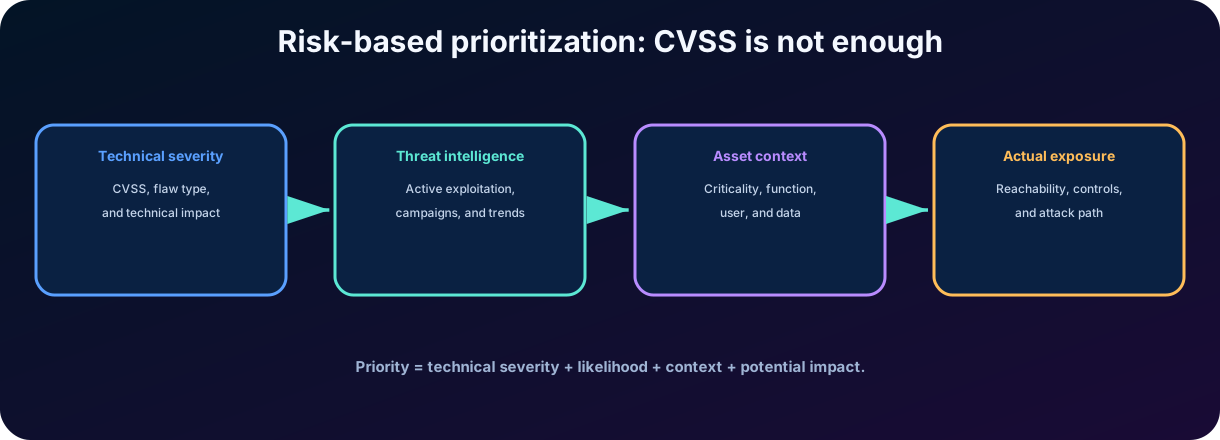
Figure 3 - Modern prioritization combines severity, threat, criticality, and actual exposure.
6. Risk-based prioritization and remediation
Defender Vulnerability Management uses Microsoft threat intelligence, breach probability, business context, and device assessments to highlight the most relevant vulnerabilities. A moderately severe flaw actively exploited on an exposed server may require attention before a flaw with a higher in an isolated lab.
6.1 Signs that raise priority
Exploitation observed in the real world or available exploit.
Critical, privileged, or sensitive data-processing asset.
Large number of devices affected.
Exposure to the internet or reach by compromised identities.
Active campaign associated with the sector or organization.
Absence of compensatory controls and ease of exploitation.
6.2 Treatment options
Treatment
When it is used
Example
Update or correct
There is a patch or safe version.
Install vendor update.
Reconfigure
The risk arises from configuration.
Disable legacy protocol or apply baseline.
Mitigate
The correction cannot be immediate.
Block traffic, disable feature, or isolate asset.
Remove
The component is not necessary or is not supported.
Uninstall end-of-life software.
Accept with exception
The risk is formally accepted for a period and justification.
Responsible registrar, expiration, and compensatory control.
6.3 Remediation requests
The solution allows you to create and track remediation activities. In supported integrations, tasks can be forwarded to the IT team, including through Microsoft Intune. Security identifies and prioritizes; operations executes; the platform tracks progress, exceptions, and impact on exposure.
7. Fundamentals of threat intelligence
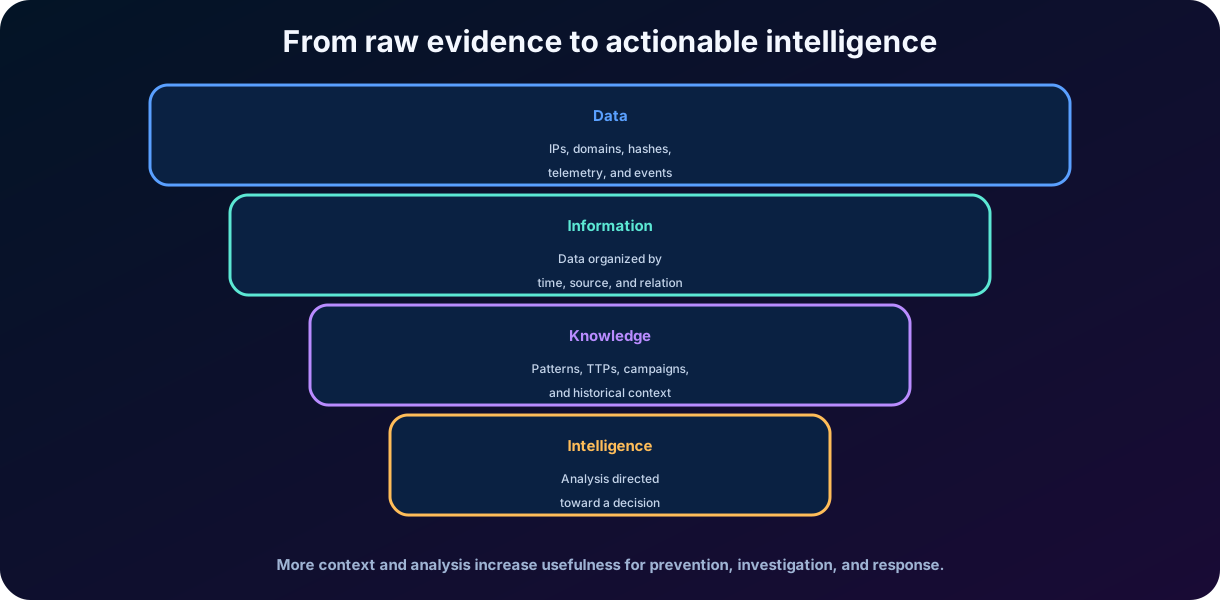
Threat intelligence is the process of collecting, enriching, analyzing, and transforming data about adversaries into knowledge useful for decision-making. It helps to answer who might attack, what objectives they have, what techniques they use, what infrastructure they control, and which defensive actions are most relevant.
Figure 4 - Data becomes intelligence when it receives context, analysis, and decision-making purpose.
7.1 Types of intelligence
Type
Horizon
Usage examples
Strategic
Long term and leadership.
Trends, motivation, target sectors, and investment in security.
Operational
Ongoing campaigns and operations.
Actor, objective, infrastructure, and campaign timeline.
Tactic
Techniques and opponent behavior.
mapped to and detection improvement.
Technique
Observable and short-term indicators.
IPs, domains, hashes, URLs, certificates, and detection rules.
8. Indicators, behaviors, and
8.1 Indicators of Compromise -
are artifacts associated with malicious activity, such as IP address, domain, URL, file hash, certificate, or email address. They are useful for searching, blocking, and enrichment, but they can age quickly because adversaries change infrastructure.
8.2 Attack indicators -
describe behaviors and sequences that indicate malicious intent, such as suspicious execution, credential dumping, or persistence creation. Behaviors tend to be more durable than technical indicators, but may require more contextual analysis.
8.3 Tactics, techniques, and procedures -
Tactics represent intermediate objectives of the adversary, techniques describe how these objectives are achieved, and procedures show specific implementations. Mapping helps to create detections and controls that remain useful even when domains and hashes change.
Element
Main question
Typical durability
Which artifact was observed?
It can be short.
What behavior indicates an attack?
Medium to high.
How does the opponent operate?
Generally more durable.
Actor profile
Who is the opponent and what is he seeking?
Evolves over time.
Campaign
What set of coordinated activities is taking place?
Limited to the period and objectives of the operation.
9. Microsoft Defender Threat Intelligence
Microsoft Defender Threat Intelligence, known as Defender TI, gathers and enriches information about internet infrastructure, indicators, actors, tools, vulnerabilities, and campaigns. Its goal is to accelerate triage, incident response, threat hunting, infrastructure investigation, and vulnerability management.
9.1 Intel profiles, Intel explorer and Intel projects
Intel profiles: library of actor profiles, tools, and vulnerabilities.
Intel explorer: exploration of analyses, artifacts, indicators, and relationships.
Intel projects: collaborative organization of artifacts and investigations in the .
Threat analytics: reports from Microsoft researchers on relevant threats and protections applicable to the environment.
9.2 Infrastructure data
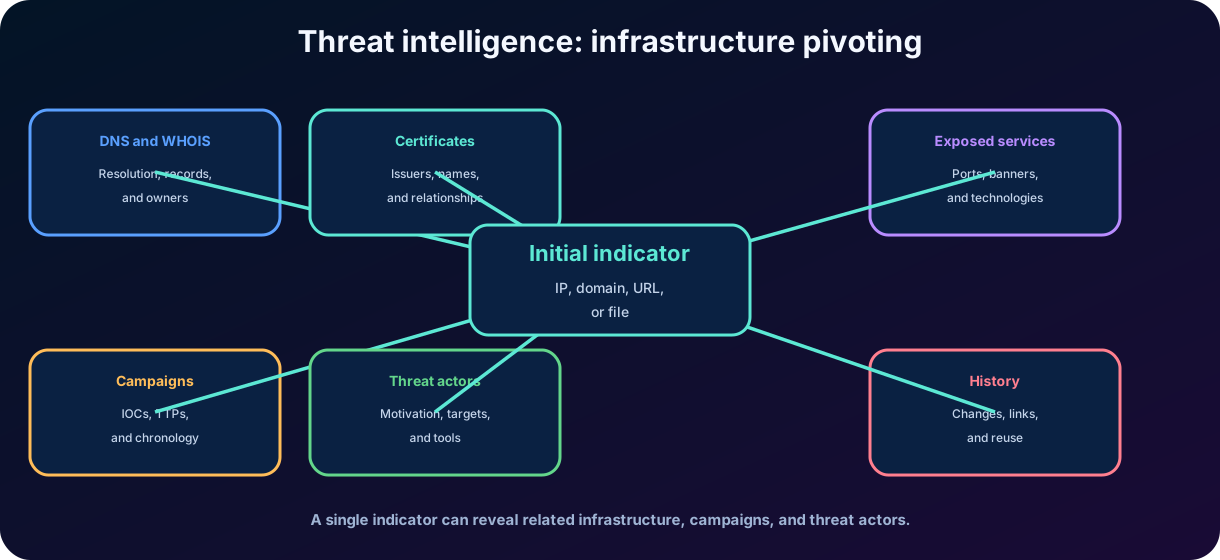
The solution correlates observations such as passive DNS, WHOIS, certificates, exposed services, relationships between hosts, and other data sets. The analyst can start from a domain or IP and discover related infrastructure, history, reputation, and threat context.
Figure 5 - An initial indicator can reveal a larger infrastructure and its relationship with campaigns and actors.
10. Threat actors, campaigns, and malicious infrastructure
10.1 Agent profiles
A threat actor profile gathers information about motivation, attributed origin, target sectors, tools, malware, , and related campaigns. Attribution is rarely absolute certainty; it should be treated with levels of confidence and evidence.
10.2 Campaigns
A campaign is a coordinated set of activities that shares an objective, period, infrastructure, malware, or target victim. Knowing about a campaign helps to look for similar signs in the environment and to anticipate the adversary's next steps.
10.3 Malicious infrastructure
Infrastructure can include domains, IPs, command and control servers, certificates, hosting, accounts, and services used for phishing, malware delivery, or exfiltration. Infrastructure chaining seeks relationships that are not obvious when an indicator is seen in isolation.
Important update - July 2026
Official documentation states that the standalone Microsoft Defender Threat Intelligence experience will be discontinued and incorporated into a unified experience within Microsoft Defender. Existing customers will maintain access to the current experience until August 1, 2026. For SC-900, continue understanding the purpose of Defender TI and follow the current terminology on the portal.
11. Microsoft Security Exposure Management
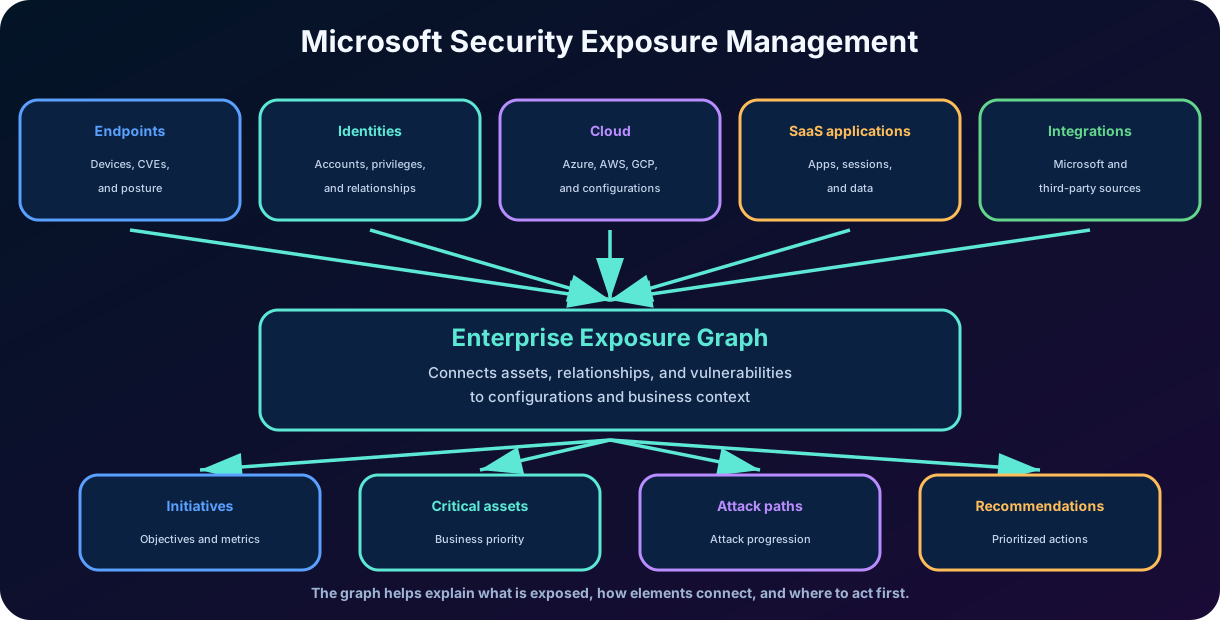
Microsoft Security Exposure Management offers a unified view of the posture and exposure risk across assets and workloads. It aggregates context from endpoints, identities, cloud resources, external surface, and integrations to enable teams to visualize relationships, identify critical assets, and prioritize actions with the greatest impact on risk.
The approach is close to the concept of Continuous Threat Exposure Management - CTEM: continuously discovering the surface, prioritizing exposures, validating plausible paths, and mobilizing remediation. The focus shifts from fixing isolated flaws to reducing real attack opportunities across the digital estate.
Figure 6 - Microsoft Security Exposure Management consolidates technical and business context for prioritization.
11.1 Exposure management versus vulnerabilities
Vulnerability management focuses on technical weaknesses and configurations, especially in devices and software. Exposure Management is broader: it combines vulnerabilities, relationships between assets, identities, clouds, external surface, criticality, and attack paths. The disciplines complement each other.
12. Critical assets, initiatives, and metrics
12.1 Critical assets
Critical assets are resources whose compromise would cause significant impact. They can be devices, identities, cloud resources, and, in current classifications, AI agents. Criticality can be identified by predefined rules, observed behavior, or custom classification.
Defining criticality improves prioritization: a failure in a domain controller, administrative account, sensitive data storage, or essential system usually deserves different handling than the same failure in a low-impact asset.
12.2
Initiatives organize the posture in measurable projects, such as endpoint security, ransomware protection, identity, cloud, critical assets, or external surface. Each initiative gathers metrics, recommendations, and a score to track progress over time.
12.3 Metrics and recommendations
Metrics indicate the state of an aspect of the initiative, the affected assets, and their relative importance. Recommendations show actions to improve the metric and reduce exposure. The objective is to transform a large set of findings into improvement programs understandable to technical and executive stakeholders.
Element
Function
Example
Critical asset
Highlight high-impact resources.
Domain administrator, sensitive database, or AI agent with broad access.
Initiative
Organize a security objective.
Protection against ransomware or endpoint security.
Metric
Measure an aspect of the initiative.
Protective covering, setup, or exposure.
Recommendation
Guide .
Apply control, correct configuration, or reduce privilege.
13. and attack surface map
The represents assets and relationships as nodes and connections. Instead of showing just a list of devices, it allows understanding how identity, endpoint, cloud resource, storage, vulnerability, and privilege are connected. This modeling makes it possible to query exposure and visualize plausible progression paths.
13.1 Queries on the chart
In the Microsoft Defender portal, the chart can be consulted by features and specific schemas. Analysts can look for exposed critical assets, identities with dangerous relationships, vulnerable devices connected to targets, and configuration combinations that create systemic risk.
13.2 Attack Surface Map
The map visually presents assets and relationships. Indicators show criticality, vulnerabilities, and node types. Expandable groups reduce noise, while detail panels display properties, findings, and the asset's main . The map helps navigate the context; it does not replace technical validation.
Important limitation
The quality of paths and maps depends on data coverage, integrations, licenses, and correct classification of critical assets. The absence of a path does not prove the absence of risk; it may indicate a lack of telemetry or that the scenario does not meet current generation criteria.
14. Attack paths, , and
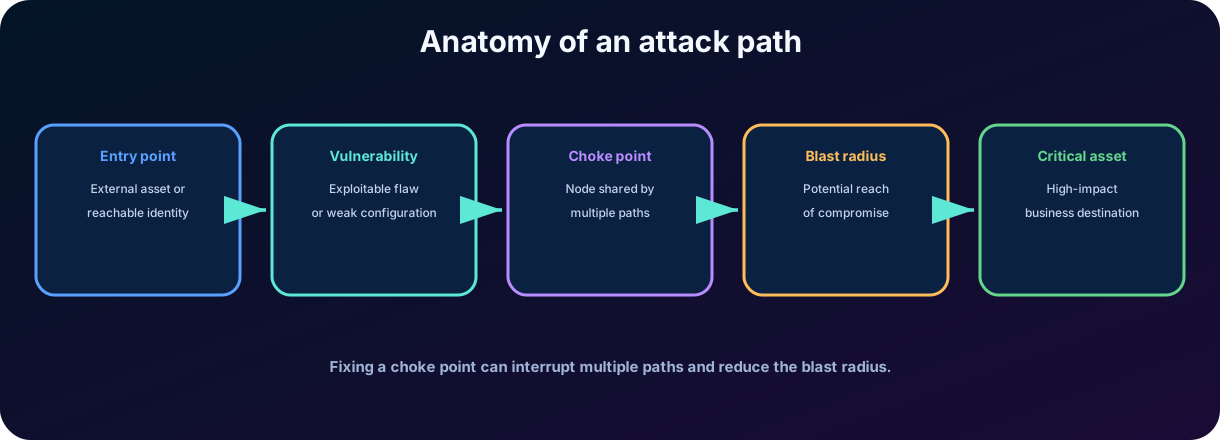
Attack paths combine assets and techniques to show how an adversary could go from an entry point to a critical asset. They can traverse endpoints, identities, on-premises environments, and cloud resources. The purpose is to make a composite risk visible that does not appear in an isolated list of vulnerabilities.
Figure 7 - An shows progression, relationships, and the reach of a potential risk.
14.1
A is an asset or relationship through which several paths converge. Fixing it can interrupt multiple routes simultaneously, offering greater risk reduction than addressing a peripheral discovery.
14.2
represents the potential extent of the impact from a compromised point. An identity with broad privileges or a server connected to many systems can significantly increase the .
14.3 Cloud and local paths
Cloud paths highlight external exposures and exploitable relationships in Azure, AWS, and Google Cloud as integrated with Defender for Cloud. On-premises paths can end in domain control assets, such as Domain Admins, Enterprise Admins, administrators, and domain controllers.
15. How the three disciplines work together
Discipline
Question answered
Main result
Vulnerability Management
What weaknesses exist and how to correct them?
Inventories, , assessments, recommendations, and remediations.
Threat Intelligence
Who operates, how does it operate, and what infrastructure does it use?
,, actors, campaigns, and threat context.
Exposure Management
Which combinations of assets and relationships create the highest risk?
Critical assets, initiatives, metrics, chart, and attack paths.
Security Operations
Is there malicious activity now and how to respond?
Alerts, incidents, hunting, containment, and recovery.
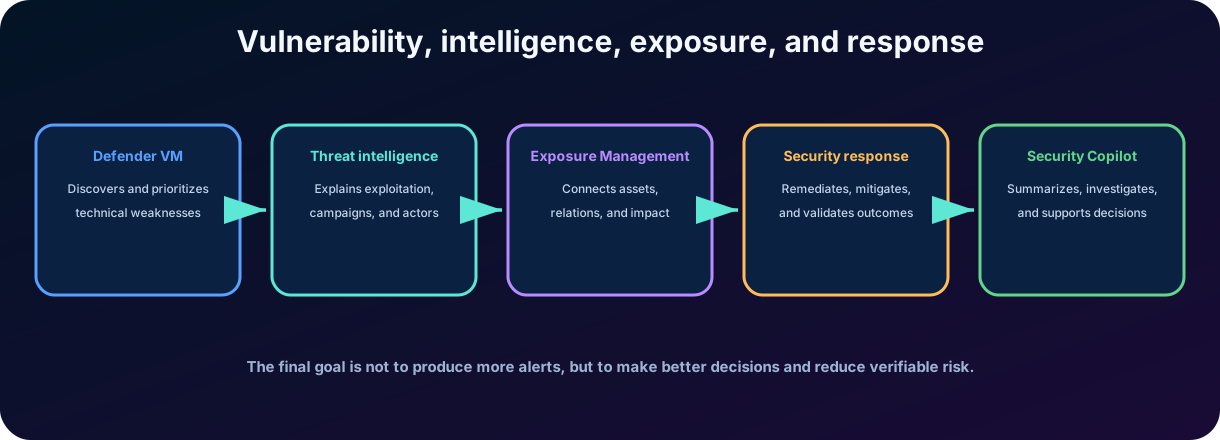
Integration changes the priority. Defending Vulnerability Management can reveal a on fifty devices. Threat Intelligence reports that the flaw is being exploited by an active group. Exposure Management shows that three devices provide a path to a critical asset. The team begins to fix these three first, create mitigation for the others, and hunt for signs of exploitation.
Figure 8 - Integrated flow turns technical discovery into risk-driven decision and response.
16. in Microsoft Defender
uses to support security professionals in investigation, hunting, intelligence, and posture tasks. On the Microsoft Defender portal, embedded experiences can summarize incidents, analyze scripts, explain commands, generate queries, and produce recommendations or reports. The analyst remains responsible for validating context and performing actions.
16.1 Incident Summary
The Copilot can condense chronology, starting point, assets, indicators, possible actors, and next . This speeds up screening, especially when the incident contains many alerts, but the summary should be checked against evidence and timeline.
16.2 Analysis of scripts and command lines
PowerShell, batch, or bash scripts can be explained in natural language. The analysis helps identify intent, techniques, and suspicious actions. Obfuscated code, incomplete context, or unsupported languages may limit accuracy.
16.3 Query assistant and Threat Hunting Agent
The Query assistant converts natural language requests into queries and explains their logic. The Threat Hunting Agent, when available, supports multi-step investigations and exploratory analysis. Simple and medium queries are well supported; complex queries should be validated before operational use.
16.4 Intelligence and vulnerabilities
can summarize information about actors, campaigns, , and , correlate intelligence content, and suggest hunting. can support actor profiling, vulnerability impact assessment, and analysis of external articles.
Principle of responsible use
Copilot is an assistant, not the final authority. Review sources, logic, data scope, permissions, and the impact of any action. can produce incomplete or incorrect answers.
17. Integrated practical scenario
17.1 Discovery
A company discovers a remote execution vulnerability on hundreds of endpoints. Defender Vulnerability Management identifies affected software and versions, exposed devices, and recommends updating or mitigating.
17.2 Enrichment by intelligence
Threat Intelligence reports that the vulnerability is being exploited in recent campaigns. A set of domains and IPs is associated with the observed infrastructure, and the indicate the use of PowerShell to download additional payloads.
17.3 Exposure context
Security Exposure Management reveals that four vulnerable endpoints are accessible by privileged users and connect to a critical server. Two appear as in attack paths leading to financial data.
17.4 Prioritized action
The team immediately isolates or mitigates the four assets, applies an emergency patch, creates hunting for the and PowerShell behavior, and schedules the correction of the other devices by risk. Exceptions require a responsible party, justification, compensatory control, and expiration.
17.5 Support from
Copilot resumes the intelligence, interprets a script found on an endpoint, and generates an initial query to search for the behavior. The analyst reviews tables, filters, time window, and possible before executing and turning the query into detection.
Expected result
The organization reduces risk in a measurable way because it combines discovery, active threat, criticality, , and operational execution - instead of ordering work only by .
18. Best practices, limitations, and pitfalls of the exam
18.1 Good practices
Keep inventories and sensor coverage up to date.
Classify critical assets with the participation of business areas.
Combine with active exploitation, criticality, exposure, and controls.
Set correction SLA by risk and monitor exceptions with expiration.
Integrate security and IT to transform recommendations into executable tasks.
Validate attack paths and AI-generated queries with real evidence.
Measure reduction of exposure, not just the number of patches applied.
18.2 Recurring traps
Incorrect statement
Correction
Every critical vulnerability must be fixed before any other.
Priority depends on active threat, criticality, exposure, reach, and impact.
is the organization's risk score.
measures the technical severity of the vulnerability, not the full context of the environment.
and mean the same thing.
is an observable artifact; describes how the adversary operates.
Exposure Management is just a vulnerability scanner.
He aggregates assets, identities, cloud, external surface, criticality, and relationships.
An proves that there was an intrusion.
It represents a potential or validated route of exposure; incidents deal with observed suspicious activity.
executes decisions without review.
It watches analysis; humans validate answers, queries, and actions.
18.3 Quick review
Defender Vulnerability Management: discover, assess, prioritize, remediate, and track.
Defender Threat Intelligence: enrich , actors, campaigns, vulnerabilities, and infrastructure.
: accelerate summary, script analysis, intelligence and hunting with human validation.
19. Conclusion
Modern cyber risk management cannot be limited to counting vulnerabilities. Microsoft Defender Vulnerability Management offers risk-based discovery and prioritization; Defender Threat Intelligence explains adversaries, infrastructure, campaigns, and context; Microsoft Security Exposure Management shows how assets and relationships form paths to critical targets.
When these capabilities are integrated, the organization can replace a generic queue of failures with a justifiable course of action. A vulnerability starts to be analyzed by the asset in which it exists, by the threats that exploit it, by the relationships that allow progression, and by the possible impact. can accelerate the reading of this context, but it does not eliminate the need for technical knowledge, governance, and human validation.
In my assessment, exposure management represents an important evolution because it brings security closer to the reality of the business. The goal is not to achieve an empty list of vulnerabilities - something impractical in dynamic environments - but to continuously reduce the opportunities that allow an attacker to reach the resources that really matter.
Summary in one sentence Vulnerability Management finds weaknesses; Threat Intelligence explains the adversary; Exposure Management prioritizes paths and assets; speeds up analysis under human supervision.
To continue studying The next chapter addresses trust, privacy, and the Service Trust Portal, shifting the focus from technical exposure to evidence of compliance, transparency, and Microsoft's commitments.
20. Review questions
Question 1
An organization has two vulnerabilities: one with a higher in an isolated lab and another actively exploited on an exposed critical server. Which approach is more appropriate?
A) Always fix the highest score first
B) Prioritize based on the combination of threat, criticality, exposure, and impact
C) Ignore with a score below 9
D) Wait for the creation of an incident
Commented answer
Correct answer: B. Risk-based prioritization considers technical severity, active exploitation, asset criticality, exposure, and possible impact.
Question 2
Which concept describes a domain, IP address, or hash associated with malicious activity?
A)
B) Indicator of commitment -
C)
D)
Commented answer
Correct answer: B. are observable artifacts used for search, blocking, and enrichment, although they can quickly lose validity.
Question 3
Which capability helps to visualize how vulnerabilities, identities, and relationships can form a path to a critical asset?
A)
B) Microsoft Security Exposure Management and attack paths
C) Service Trust Portal
D) Microsoft Purview Audit
Commented answer
Correct answer: B. Exposure Management uses the exposure chart and attack paths to contextualize progression to critical assets.
Question 4
How should be used when generating a query for hunting?
A) Execute and automate without review
B) Consider the query always correct
C) Review logic, tables, filters, time window, and results before use
D) Replace all existing detections
Commented answer
Correct answer: C. Copilot speeds up creation, but queries and conclusions must be verified by responsible professionals.
21. Glossary and official references
21.1 Essential Glossary
Term
Meaning
Standardized identifier of disclosed vulnerability.
Technical severity metric; it does not represent the entire business risk.
Observable artifact associated with possible impairment.
Behavior or sequence that indicates intention to attack.
Tactics, techniques, and procedures used by adversaries.
Endpoint ; lower is better.
Device configuration posture score; higher is better.
Asset model, relationships, and exposure context.
Route that combines assets and techniques toward a critical target.
Point where several paths converge.
Potential extent of the impact from an impairment.
Measurable project that groups security metrics and recommendations.
21.2 Microsoft Learn References
Study guide for Exam SC-900 - learn.microsoft.com/credentials/certifications/resources/study-guides/sc-900
Microsoft Defender Vulnerability Management - learn.microsoft.com/defender-vulnerability-management/defender-vulnerability-management
Content validated on July 24, 2026. Microsoft continuously updates features, licensing, integrations, and portal experiences; for deployment decisions and future dates, always check the current official documentation.